15 October 2026 · 5 min read
What is a shared inbox, and when does a team need one?
A shared inbox is one place where a team receives and answers customer messages together, and every conversation shows who owns it, whether it still needs a reply, and what teammates said about it behind the scenes. A team needs one as soon as two people answer the same customers, because that is the moment emails start getting answered twice, or not at all. Below: how it works, how it differs from a group address or a shared login, the signs you have outgrown a normal inbox, and how to switch without losing a week to it.
How a shared inbox works
Think of a normal inbox, then add three things it was never built for: an owner, a status and a private conversation about the conversation.
The owner answers the question everyone in a small team asks daily: is someone on this? Each message is assigned to one person, or visibly assigned to nobody, which is just as useful to know. The status tells you whether the customer is waiting on you or you are waiting on them, so nobody has to open twenty threads to find the three that need a reply. Internal notes let a colleague write "refund approved, tell her it lands Friday" right inside the thread, where the customer never sees it and the next person always does.
The screenshot below is from suppp, the tool behind this blog, and shows the idea in one list: live chats, missed chats and email side by side, each with a status and the teammate who owns it.
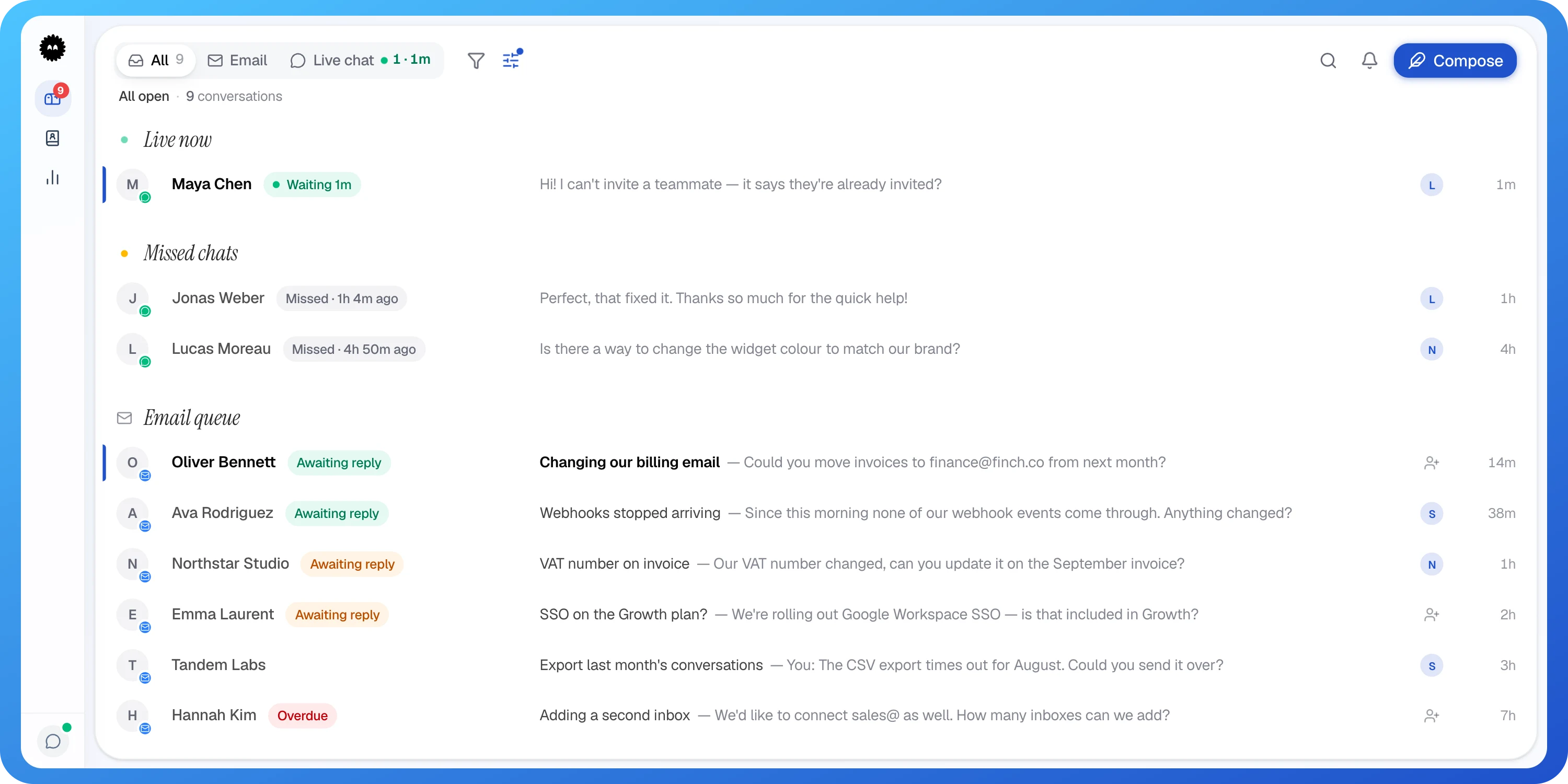
- 1Live chats that are waiting right now come first
- 2Chats nobody got to in time are kept, not lost
- 3Email sits in the same list as chat
Each conversation in the list shows the customer's name, a status and the teammate it is assigned to, with live chats waiting right now grouped at the top.
Shared mailbox vs group address: what is different
People use these terms loosely, so it is worth separating three setups that often get called the same thing.
A group address, like support@, forwards every message to several personal inboxes. Everyone sees everything, nobody knows who replied, and the customer sometimes gets two different answers from two cheerful people. A shared login means the whole team signs into one Gmail or Outlook account. Now there is one copy of each message, which is better, but anyone can mark an email as read without answering it, and you cannot tell who said what.
A shared inbox tool sits on top of your address. Customers still write to support@ and still get replies from it. The difference is on your side: messages are assigned, tracked and discussed, and each teammate signs in as themselves.
Signs you have outgrown your inbox
Nobody wakes up wanting a new tool. You usually notice the symptoms first. If two or more of these sound familiar, the inbox is now the bottleneck, not the people.
- Customers get two replies to one question, sometimes contradicting each other.
- Someone asks "did anyone answer this?" in your team chat more than once a week.
- Emails get marked as read and then forgotten, because reading felt like handling.
- A customer follows up with "just checking you got this", and you had, three days ago.
- When one person is on holiday, their customers quietly go unanswered.
- You cannot say how many conversations are open right now without counting by hand.
- New hires need the whole history explained in person because nothing is written down next to the email.
When a regular inbox is still fine
If one person handles every customer message and the volume fits comfortably in their day, a normal inbox with a few labels is perfectly good. Adding a tool to a one-person job mostly adds a login.
The same goes for a team where messages almost never overlap, for example one person on sales enquiries and another on invoices, each with their own address. The trouble starts when two people can reasonably both think a message is theirs, or both think it is the other one's. That second case is the dangerous one, because it looks exactly like everything being fine.
How to switch without the chaos
The switch itself is small. Most of the mess comes from changing tools without changing habits, so agree on the habits first.
- Pick one cut-over day and tell the team which inbox is the real one from then on. Two live inboxes for a month is worse than either.
- Agree on how ownership works: for example, whoever replies first owns the conversation until it is closed, and handing over means a note plus reassigning.
- Write down what "done" means. A useful rule: close a conversation when the customer has what they need, not when you have replied.
- Save your five most repeated answers as ready-made replies on day one, such as "Your refund is on its way and should reach your account within a few working days."
- Set a simple daily check: each morning, look at anything unowned and anything the customer is waiting on, and give it an owner before lunch.
- Keep the old mailbox readable for reference, but stop answering from it so nothing splits across two places.
Questions people ask
Is a shared inbox the same as a help desk?
- Not quite, though the line is blurry. A shared inbox focuses on letting a team answer messages together with owners, statuses and notes, while a help desk usually adds things like a knowledge base, reporting and more formal ticket workflows. Many small teams start with a shared inbox and only need the rest once volume or team size grows.
Can customers tell we are using a shared inbox?
- Generally no. They write to the same address as before and replies come back from it, often signed with the name of the person who answered. The only difference they tend to notice is that replies arrive faster and do not contradict each other.
Should everyone in the company have access to the shared inbox?
- Give access to everyone who answers customers, plus anyone who regularly gets pulled in for answers, like the person who handles refunds. People who only need to see a message now and then can be mentioned in a note or sent a summary instead. Fewer people with clear ownership beats a crowd where everyone assumes someone else has it.
What happens to old emails when we move to a shared inbox?
- That depends on the tool, and many start fresh with new messages only. The simple approach is to keep the old mailbox available for looking things up, finish any open threads there, and answer everything new from the shared inbox. After a few weeks the old mailbox becomes an archive you rarely open.