15 October 2026 · 5 min read
How to share a support@ email address with your team
To share a support@ email address with your team, set it up as a shared mailbox or group that everyone opens with their own login, or connect it to a shared inbox tool where each email has one owner. Whichever setup you pick, agree who answers what, so customers get one reply instead of three, or none. The setup takes an afternoon. The habits take a bit longer, and they are the part that decides whether it works. Below are the options, how to do it in Gmail or Outlook, the house rules, and wording you can paste in.
Your four options, from quickest to calmest
There are four common ways to let several people answer one support address. They differ in cost, and in how often you discover on Friday that nobody answered Tuesday's email.
- Share the password: everyone logs in to the same account. Free and instant, and also the reason nobody knows who promised the refund. Sign-in codes land on one person's phone, and when someone leaves you change the password for everyone.
- Forward to everyone: support@ sends a copy to each teammate's own inbox. Everybody sees everything, so everybody assumes someone else replied. Answers go out from personal addresses, and soon the customer is emailing Dave directly.
- Use a shared mailbox or group: Outlook has shared mailboxes that appear next to each person's own inbox, and Gmail lets you give teammates delegated access to a mailbox. Each person keeps their own login and replies can go out as support@.
- Connect it to a shared inbox tool: you connect the address once, and every email becomes a conversation with an owner and a status. It costs money, and tends to earn it back the first time someone is on holiday.
Doing it in Gmail or Outlook without a new tool
If you have a handful of emails a day, the tools you already pay for are enough. The trick is adding the structure they do not give you by default.
The limit of this setup is that it runs on the honour system. A label does not complain when an email has waited two days, and nothing stops two people opening the same message at the same time. If that starts happening weekly, you have outgrown it.
- Make support@ its own mailbox, not an alias that lands in the founder's personal inbox.
- Give each teammate access with their own login: delegation in Gmail, membership of a shared mailbox in Outlook.
- Set replies to send as support@, so customers never learn your personal addresses.
- Mark ownership the moment someone takes an email: a label per person in Gmail, a category per person in Outlook.
- Archive or move an email to Done only when the customer has what they need.
- Agree fixed times to check the inbox, such as 9, 12 and 4, so it is nobody's background worry.
Rules that stop double replies and dropped emails
Most shared inbox trouble is not technical. It is two polite people each waiting for the other, or two keen people both answering. A few written rules fix most of it, and they work with any setup.
- Give every email exactly one owner, the moment someone opens it with intent to answer.
- Reply from support@ and sign with your first name, so the customer knows who they are talking to.
- Discuss cases internally, never by copying a colleague into the customer's thread.
- Hand over in writing: what the customer wants, what has been tried, and what has been promised.
- Set a rota for who watches the inbox each day, so quiet days do not become nobody's days.
- Define done as the customer having their answer, not as you having replied once.
When a shared inbox tool is worth paying for
The signs are familiar: labels nobody updates, customers getting two different answers, and a holiday that ends with a pile of unanswered email. At that point you want the tool to show who owns what, instead of hoping everyone remembers.
suppp is one option built for small support teams. On the paid plans you connect Gmail and Outlook inboxes, and those emails are answered from the same shared inbox as your website chats. Starter is €39 a month (€31 billed yearly) with 3 seats included, up to 3 email inboxes, team assignment, tags and canned responses. Every plan has internal notes, snooze and a daily inbox summary. The free plan does not include email, and new accounts get a 14-day Starter trial with no credit card.
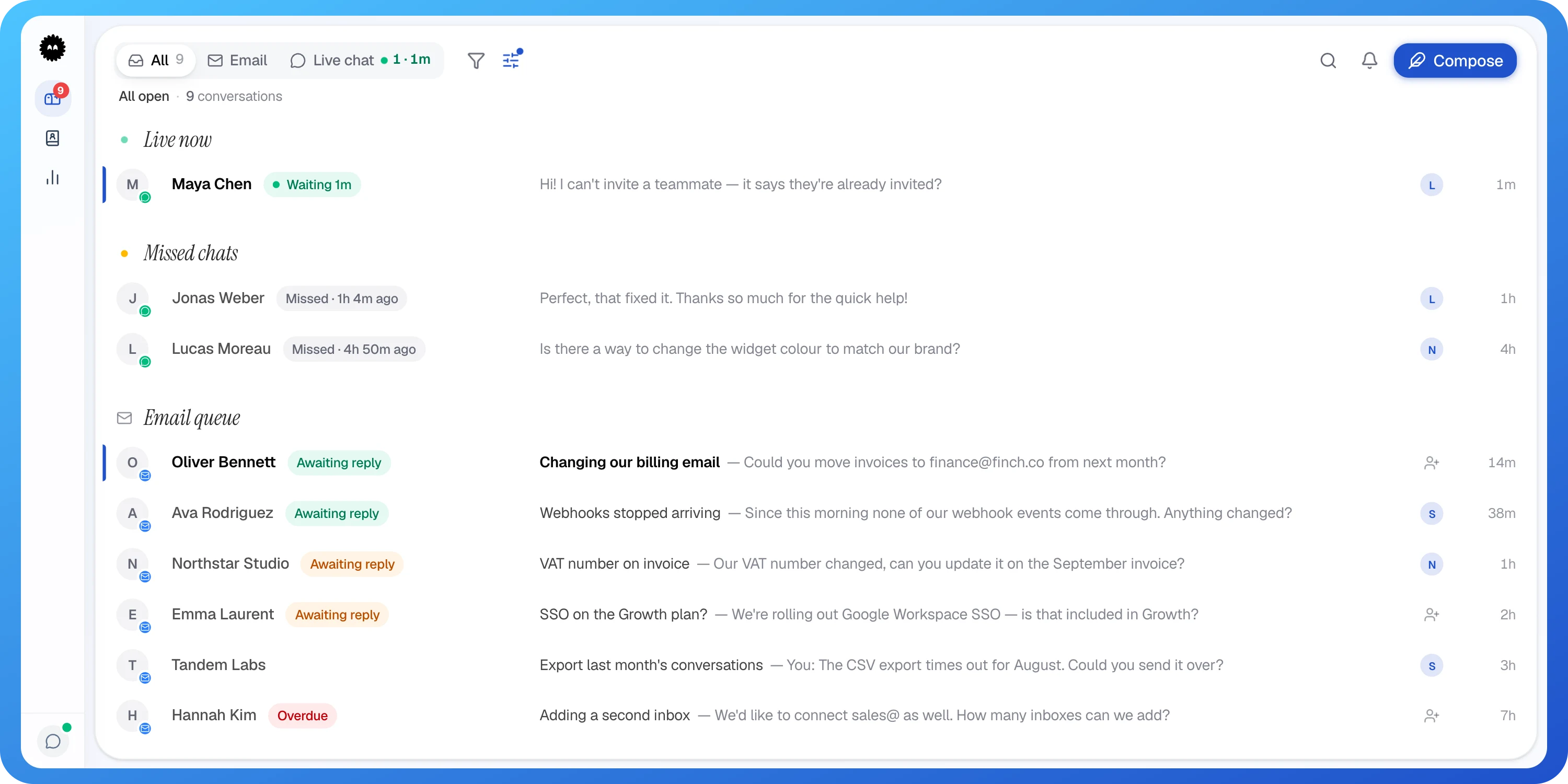
- 1A teammate's initial: this one has an owner
- 2No initial: nobody has picked this up yet
On the right of each conversation in suppp's inbox, a teammate's initial shows who owns it, a person-plus icon marks the ones nobody has picked up yet, and you can see how long ago the last message came in.
Wording your team can copy
Shared addresses can feel faceless, so the wording should do the opposite. Swap in your own names and times.
- First reply: "Hi Maria, thanks for writing in. I'm Sam and I'll look after this for you. I've checked your order and it left our warehouse yesterday."
- Handing over to a colleague: "Hi Maria, I'm passing this to Priya, who handles refunds. She has everything you've sent, so you won't need to repeat it. She'll reply by the end of tomorrow."
- Internal handover note: "Priya, refund for order 4471. Customer sent photos of the damage. I promised a reply by Thursday. Nothing refunded yet."
- Out of hours auto-reply: "Thanks for your email. We answer support@ Monday to Friday, 9:00 to 17:30, and will reply on the next working day."
- Signature: "Sam, support team at [Company]. Reply to this email and anyone on the team can pick it up."
Questions people ask
Can several people log in to the same support email account?
- They can, but it causes more trouble than it saves. Sign-in codes go to one phone, you cannot see who sent which reply, and every departure means changing the password for everyone. Separate logins with access to a shared mailbox avoid all three.
How do I stop two people replying to the same customer email?
- Give every email a single owner as soon as someone picks it up, and make that visible with a label, a category or an assignment in a shared inbox tool. Agree that nobody replies to an email someone else owns without asking first.
Should replies from a shared support address use a personal name?
- Yes, sign with a first name even when the email comes from support@. Customers trust a person more than a department, and it tells them who to mention if they write back. The reply still goes to the shared address, so anyone can pick it up.
What happens to support@ emails when someone leaves the team?
- If everyone has their own login, you remove that person's access and the mailbox carries on unchanged. Before they go, reassign anything they own and ask for a short handover note on open cases. With a shared password, you also need to change it and tell everyone else.